ABX Pentra XL 80 Student User Guide
How to start the instrument, register samples, run CBC + 5-part differential (5-DIFF), review results, validate, and shut down.
Purpose
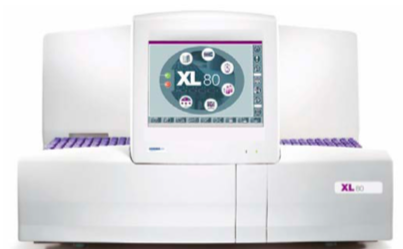
This guide ensures that students gain a clear, practical understanding of how to operate the ABX Pentra XL 80 hematology analyzer to perform complete blood count (CBC), cell counting, and 5-part differential (5-DIFF) analysis.
Scope
This guide covers the following tasks:
- Instrument start-up
- Patient and sample registration (patient ID)
- Assigning samples and verifying reagents
- Results review
- Flags
- Validation
- Instrument shutdown
Background
The ABX Pentra XL 80 is a fully automated hematology analyzer designed for clinical laboratory blood testing. It supports high-throughput and accurate hematology measurements and reports a broad panel of parameters, including hemoglobin and 5-DIFF (five-part leukocyte differential).
The analytical workflow relies primarily on differences in blood cell size and complexity. It separates erythrocytes (RBC), platelets (PLT), and leukocytes (WBC) using electrical impedance. Leukocyte sub-populations are further differentiated using light scatter (related to nuclear and cellular morphology), and hemoglobin is measured using spectrophotometry.
Analytical Principles
1) Electrical impedance (cell counting by volume)
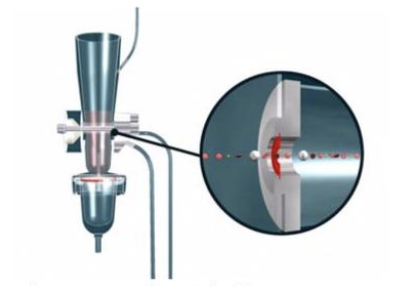
The sample is diluted with an electrolyte diluent and aspirated through a precisely sized aperture. Two electrodes maintain a constant electrical current across the aperture. When each cell passes through, it temporarily increases electrical resistance (impedance). The measured pulse amplitude is proportional to cell volume: larger cells generate larger pulses; smaller cells generate smaller pulses.
2) Light scatter (flow cytometry concept)
In a flow-based optical measurement, cells pass through an illuminated region (lamp/laser). The interaction between light and cells produces scatter signals detected at defined angles. Forward scatter (FSC) correlates primarily with cell size, while side scatter (SSC) correlates with internal complexity and granularity. These signals support separation of leukocyte populations when combined with other measurements.
3) Spectrophotometry (hemoglobin measurement)
Hemoglobin is quantified using spectrophotometry in a dedicated measurement chamber. In practice, the method converts hemoglobin into a measurable chromogenic form, and optical absorbance is used to estimate concentration.
Analyzer Chambers and 5-DIFF Output
Analyzer chambers
- Hemoglobin chamber: spectrophotometry-based measurement.
- RBC/PLT counting chamber: impedance-based counting.
- WBC/BASO counting chamber: impedance-based counting (including basophils channel logic).
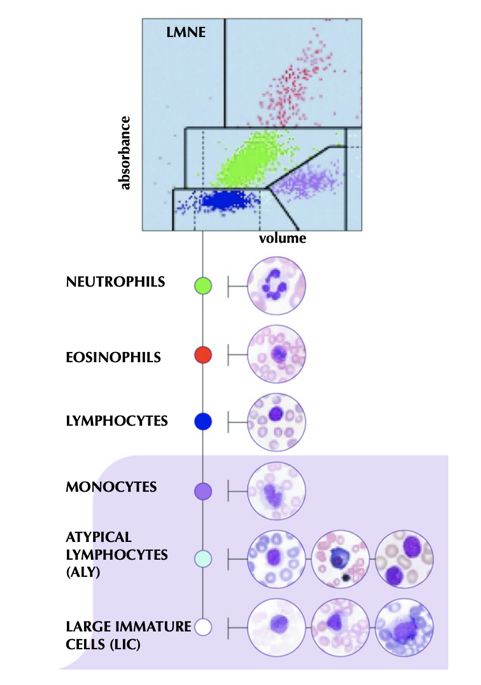
- LMNE dilution/DIFF chamber: combines impedance, light scatter, and cytochemical reactions to perform differential classification.
Interpreting a 5-DIFF (LMNE matrix)
The 5-DIFF result is displayed both as percentages and as an LMNE matrix plot. The matrix typically places a volume-related feature on one axis and a complexity/absorbance-related feature on the other, allowing clear separation of lymphocytes, monocytes, neutrophils, and eosinophils. Basophils are usually presented separately due to their relatively low proportion in peripheral blood.
Equipment and Reagents
- Instrument: ABX Pentra XL 80
- Sample: EDTA whole blood
- Core reagents: ABX reagents (inside instrument), ABX Diluent (external), and waste container (external)
Operating Procedure
1) Start up the instrument
- Press the power button on the right side of the instrument.
- Log in using your assigned username and password.
- After login, you will see the software overview:
- Contextual toolbar: edit, cancel, print, validate actions.
- Generic toolbar: common functions such as Worklist, Reports, Alarms, Start Rack, and archived results.
- Main menu: quality control, logs, status, service, settings.
- Startup/Shutdown controls.
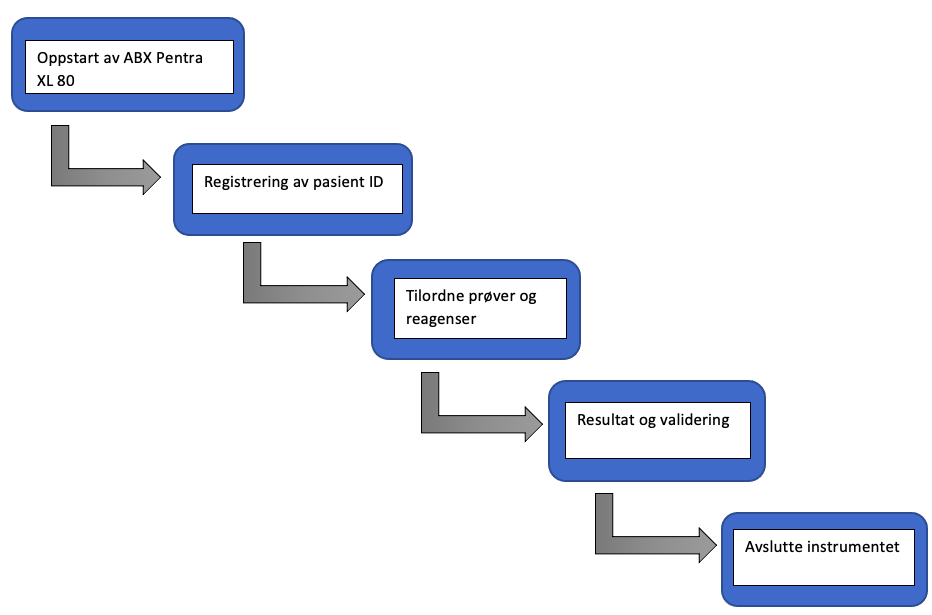
2) Register the patient ID (sample entry)
- Open Worklist.
- Select Rack view to register a rack and its samples.
- Enter the Rack Number using the instrument keyboard.
- Select an available rack position and complete the required fields (as configured in your lab), e.g.:
- Sample ID
- Collection date
- Patient ID
- Patient name / first name
- Date of birth / age
- Gender
- Confirm (check/OK) to register the sample.
- Repeat until all samples are registered.
3) Assign samples and verify reagents
- Confirm that internal ABX reagents are loaded and within expiry. If out-of-date or missing, the Alarm indicator will highlight issues.
- Check external ABX Diluent level and expiry date.
- Check the Waste container is not full; empty it if needed according to lab procedures.
- Load EDTA blood tubes into the rack (up to 10 positions), matching rack numbering and positions.
- Place the rack into the instrument with the rack number facing you and sample tubes facing away (per standard loading orientation).
- Press Start Rack to begin analysis.
4) Review results
- Open Reports to view analyzed samples.
- Results appear progressively as each sample completes.
- Select a sample line to inspect details. The 5-DIFF result is typically shown in the lower section with both percentage values and the LMNE matrix.
- Click the LMNE matrix to enlarge it for interpretation.
4.1) Flags
Flags indicate potential abnormalities or analytical concerns. If a parameter is outside expected limits or the pattern is atypical, the system may display an alert icon (e.g., an exclamation mark) next to relevant values.
4.2) Validation
- Return to the report list.
- Select the samples to be validated.
- Press Validate (as labeled in your interface) to confirm results.
5) Shut down the instrument
- When analysis is complete, the rack will exit and become accessible from the right side—remove and clear it.
- Return to the software overview (return/back).
- Press the Quit icon in the lower-right corner of the software.
- Use the physical power button on the right side of the instrument to switch off (per lab policy).
Student Questions (Self-Check)
- What are the three main blood cell types, and what are their roles in the body?
- The ABX Pentra XL 80 uses multiple analytical principles. Briefly explain:
- Electrical impedance
- Light scatter
- Spectrophotometry
- What is the purpose of performing CBC/cell counting and a 5-DIFF?
- Why are multiple analytical principles needed to perform a reliable 5-DIFF?
- How do you interpret a 5-DIFF plot (LMNE matrix)? What do the axes represent conceptually?
References
- HORIBA Medical. ABX Pentra XL80 User Manual. 2007.
- Keohane EM, Otto CN, Walenga JM (eds.). Rodak's Hematology: Clinical Principles and Applications. 6th ed. Elsevier; 2020.
- Nguyen TT, Ngo HT. Automatic White Blood Cell Classification Using Deep Learning Network. IFMBE Proceedings. 2022.
- Nkrumah B, et al. Hemoglobin estimation by the HemoCue® portable hemoglobin photometer in a resource poor setting. BMC Clin Pathol. 2011;11:5.
- Riedl J. Challenges in hematology diagnostics. 2014.